DJs
Vocal and instrumental layers for mashups, transitions, and live sets. Quick 2-stem split in the browser is usually enough for testing.
Online stem splitter
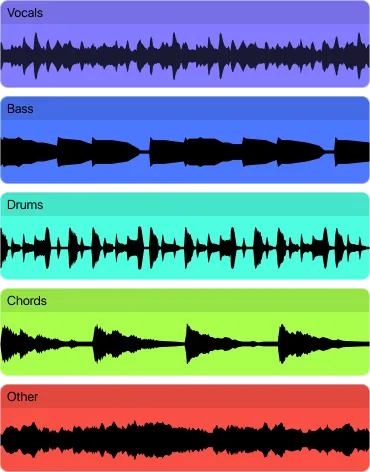
Get separate vocal and instrumental tracks from any song in the browser. For deeper 5-stem splits (vocals, drums, bass, piano, other), continue on the mobile app.
Drop a song here — or tap to try it on your track
Free, in your browser. No signup. MP3, WAV, FLAC, M4A, OGG, or video.
Choose a fileDifferent people need different things from the same tool.
Vocal and instrumental layers for mashups, transitions, and live sets. Quick 2-stem split in the browser is usually enough for testing.
Reference stems for sampling, arrangement study, and remix prep. Most chain separation with DAW cleanup for production use.
Practice-ready stems for focused listening, drills, and play-along. Remove the instrument you want to practice.
The browser and mobile apps offer different levels of separation. More stems means more control but also more chances for bleed between instruments.
| Browser (free) | Unmix App | |
|---|---|---|
| Stems | Vocals + Accompaniment | Vocals, Drums, Bass, Piano, Other |
| Price | Free, no account | One-time purchase |
| Processing | On your device in browser | On your device, fully offline |
| Artifact level | Lower — only one split decision | Higher — 5-way split means more bleed |
| Best for | Quick test, karaoke, quality check | Production, practice, individual instrument control |
Not all stems separate with equal quality. Here is how they typically rank.
Vocals are the easiest to separate. Centered, dry vocals in clean mixes come out the cleanest.
Kick and snare reduce well, but cymbal and hi-hat energy sometimes leaks into other stems.
Bass shares low-end with kick drums. Piano shares harmonic space with guitars and synths. Expect partial isolation on these.
Serato Stems, Virtual DJ Stems, and Traktor Pro Plus do separation in real-time on the deck. When they fail — or when you need cleaner output — these are the scenarios where pre-extracting with a dedicated tool wins.
Serato Stems and Virtual DJ Stems separate in real-time but use smaller, faster models that struggle on 808-heavy hip-hop and dense rock. Pre-extract with Unmix or the Unmix app, drag the separated stems into your deck, and trigger them individually. Especially useful for mashups where you need a vocal from one track and a clean drumline from another without real-time artifacts ruining the transition.
When building a sample library from separated stems, use a folder structure like /drums/120bpm/ and name files 120_Am_KickLoop.wav. Tools like Rekordbox and Ableton Live can auto-warp and key-match if the metadata is right. Run BPM and key detection (Mixed In Key, Rekordbox's analyzer) after extraction, not before — separated drums occasionally confuse BPM detectors.
Spleeter (Unmix's browser model) outputs 2 or 5 stems: vocals, drums, bass, piano, other. Demucs v4 hybrid-transformer goes to 6 by separating guitar from 'other'. MDX-Net models top 4 stems but with fewer artifacts. If you specifically need a guitar stem, browser Spleeter won't get you there — use Demucs via MVSep or the Unmix app's higher-tier model.
Upload any song and hear the separated stems in seconds. Free, no account needed.
If the stems are going into a DAW, start with lossless input. The quality difference is noticeable on bass and piano stems.
The browser's free 2-stem split tells you quickly whether the track is a good candidate for deeper separation on mobile.
Some users get the best drum stem from one tool and the best vocal from another, then combine in their DAW.
Separation quality depends on mix density, effects, stereo placement, and source file quality. Sparse mixes with well-separated instruments give the best results.
The browser splits into vocals and accompaniment. The mobile apps go further with drums, bass, piano, and other as separate stems.
Bass and piano are typically the hardest because they share frequency ranges with kick drums and guitars respectively.
For most tracks, one tool is enough. On difficult material, advanced users sometimes compare outputs from 2-3 tools.
Serato, Virtual DJ, and Traktor Pro Plus do separation in real-time on the deck. Speed is their advantage; quality is the tradeoff — they use smaller models that struggle with dense mixes. Unmix and similar pre-processing tools let you run heavier models (Spleeter/Demucs/MDX) offline, export cleaner stems, then drop them into your deck of choice. Use deck-stems for most tracks; pre-extract the difficult ones.
Not from the browser version. Spleeter's 5-stem model separates vocals, drums, bass, piano, and 'other' — guitars and synths both land in the 'other' bucket. For a dedicated guitar stem, use Demucs v4 (via MVSep.com or the Unmix mobile app), which separates guitar as its own stem. Expect bleed between guitar and piano when both are harmonically layered.
The browser tool runs one file at a time to respect memory limits. For batch work across a 20-40 song setlist, use the Unmix mobile app (iOS and Android) which queues extractions and can run overnight on charging. Alternative: a local install of Demucs via Python handles batches of hundreds but needs a capable GPU (Nvidia RTX 3060 or better).
Remove vocals from any song and keep the instrumental.
Isolate vocals for remixes, mashups, and covers.
Create backing tracks for singing and practice.
Remove drums, bass, or piano from a track.
Extract and separate audio from video files.
Full 5-stem separation on iOS, Android, and Mac.